Smart Staging included
Print a staging location label for each new buyer on the first sale, then keep dropping their items into the right box while the show progresses.
WNLabelPro is a seller workflow tool for Whatnot label printing. It pairs a desktop app with a browser extension so sold items, Smart Staging, and bundle tracking stay in sync while your show is moving. It was built to reduce mistakes, speed up packing, and make label output feel dependable during a live workflow.
Built for sellers who want fewer mistakes, a cleaner workflow, and label output they can trust during every show. Installation is public. A valid WNLabelPro license is required after setup.
If you are searching for Whatnot label printing software, Whatnot seller tools, a seller workflow tool, or a cleaner Whatnot order workflow, this is the core job WNLabelPro is built to do.
WNLabelPro is an independent seller workflow tool and is not affiliated with or endorsed by Whatnot.
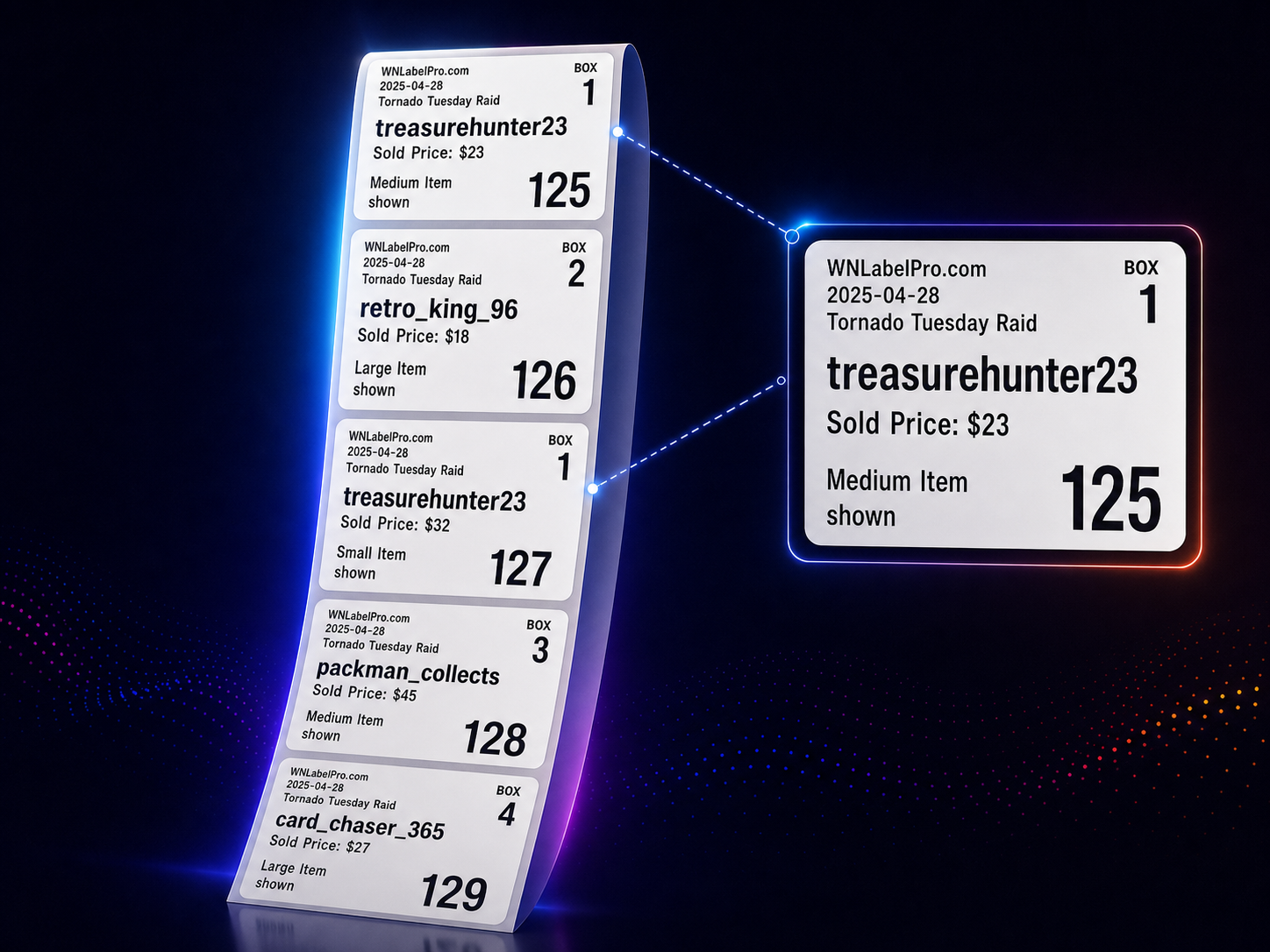
The label is the product moment. WNLabelPro gives every order a clean, easy-to-read label with buyer name, sold price, item details, show name, assigned box number, and strong numbering so the next order is easy to spot.
WNLabelPro is for sellers who run shows fast, want fewer mistakes, and need a workflow that stays useful from the first sale to the last packed box.
Print a staging location label for each new buyer on the first sale, then keep dropping their items into the right box while the show progresses.
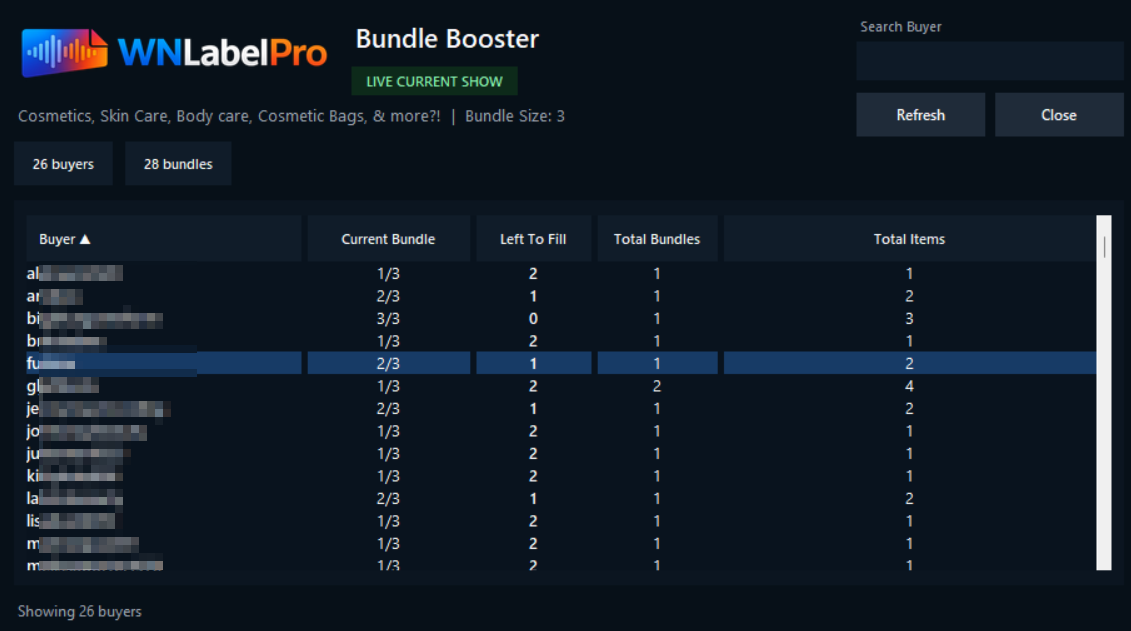
See who still has room in their bundle so you can call them out by name and turn unused free-shipping space into another sale.
The extension captures supported Whatnot show and sold-item information, and the desktop app handles printing, staging, licensing, and the rest of the workflow.
WNLabelPro was created by a real Whatnot seller to solve the exact label, staging, and packing problems that show up during live streams.
Install WNLabelPro, add the browser extension, activate your live show, and let the desktop app handle the label workflow while you keep selling.
Smart Staging prints a staging location label with each new buyer on the first sale. Put that label on the box and simply put the buyer's items in that box while the show progresses. When the preconfigured bundle number is met, the following item prints a new box label with a new number, restarting the bundle process and making packing and shipping a breeze.
If Smart Staging is configured, Bundle Booster shows you quickly who has items left in their bundle so you can say the right thing at the right time. The buyer search field, current bundle progress, spots left to fill, total bundles, and total items stay in one place so the next easy win is easier to see.
"Ashley, you've got 2 spots left in your bundle. Might as well take advantage of it while you've got free shipping."
That kind of quick nudge can turn unused bundle space into another sale before the moment is gone.
Current supported label sizes are 1" x 1", 2" x 1", and 1.5" x 1.5". Confirm your printer supports the label size you plan to use. The extension workflow is compatible with both Google Chrome and Microsoft Edge.
Smart Staging is included in every paid plan. Bundle Booster is available on Solo as an add-on and included on Business and Business Plus.
Want to try it first? Download the desktop app and start a 7-day free trial. The trial is one time per computer and requires your email address plus acceptance of the legal terms before it begins.
Your checkout buttons below will use this email address.
By starting a trial, buying, downloading, installing, or using WNLabelPro, you agree to the Terms of Service, Privacy Policy, Refund and Cancellation Policy, and Disclaimer. Paid plans renew until canceled.
One seller, one seat, Smart Staging included, Bundle Booster available as an add-on.
The same Solo seat plus Bundle Booster so you can push bundle momentum harder during live selling.
Three seats for teams that need a shared live-show workflow without doing seat math every month.
Custom seat count and custom monthly pricing for larger teams or more specialized workflows.
WNLabelPro does not need a hard download gate. Install the desktop app, install the browser extension, and then either start the 7-day trial or activate with your valid license. That keeps reinstalls and hotfixes simple without weakening your licensing.
Want the written version too? Use the Install and Quick Start guide.
Use the public desktop download page whenever you need a fresh install, a reinstall on a new machine, a fast hotfix rollout, or the first step of the 7-day trial flow.
Download Desktop App Read Install GuideThe extension is the live-show side of the workflow. Use the public extension listing as the install path for Google Chrome or Microsoft Edge.
Using Microsoft Edge? Open the same listing from inside Microsoft Edge and follow the Edge install steps.
WNLabelPro is an independent seller workflow tool and is not affiliated with or endorsed by Whatnot. You remain responsible for verifying labels, buyer details, addresses, shipping choices, and printer output before relying on them in a live workflow.
The extension workflow currently works with both Google Chrome and Microsoft Edge. The desktop app and browser extension work together as one system.
If Chrome pauses the installer download or Windows shows a SmartScreen warning, use the built-in walkthrough and double-check the file details before continuing.
WNLabelPro currently supports 1" x 1", 2" x 1", and 1.5" x 1.5" labels in the live workflow.
Giveaway, Buy It Now, and flash sale purchases are coming soon. The current live workflow focuses on supported sold-item events.
WNLabelPro supports your seller workflow. It does not bid, buy, or automate checkout actions on your behalf.
After checkout, WNLabelPro emails the license key to the address you entered at purchase.
Download the desktop app, open it, enter your email address, and accept the legal terms to start the 7-day trial. The trial is one time per computer.
Yes. Every WNLabelPro license tier includes unlimited labels all month long, so busy sellers are not watching a label counter or dealing with per-label limits like some other tools.
Yes. The browser extension captures supported Whatnot show and sold-item information, and the desktop app handles printing, staging, licensing, and the rest of the workflow.
No. WNLabelPro is built to support your seller workflow by capturing supported show and sold-item information for labeling, staging, and bundle tracking.
Bundle Booster is included on Business and Business Plus. Solo sellers can buy it as an add-on or start with the Solo + Bundle Booster plan.
Smart Staging follows the bundle size you set. When a buyer reaches that size, the next item starts a new bundle and WNLabelPro assigns a new staging location number for that buyer's next group of items.
If you want a cleaner show, faster packing, and less table chaos, pick your plan and go straight to checkout.
Walkthroughs, updates, and seller workflow notes.
Watch walkthroughs on YouTube
Use the official WNLabelPro YouTube page for install videos, walkthroughs, and workflow examples.
youtube.com/@WNLabelPro
Follow updates on Facebook
Use the official WNLabelPro Facebook page for product updates, announcements, and seller-facing posts.
facebook.com/WNLabelPro